http://www.scribd.com/doc/26852990/Characterization-of-Technological-Processes
http://www.scribd.com/doc/26852984/Microonde
http://www.scribd.com/doc/26852982/Metodi-Numerici-per-Sistemi-Differenziali
http://www.scribd.com/doc/26852980/Certificazione-e-Standard-nei-Sistemi-di-Telecomunicazioni
what else to add? 4 new docs from Tibia! Nice work
Sunday, 14 February 2010


Sunday, 7 February 2010
so my thesis is up
Parallel and Distributed Programming on Low Latency Clusters
aaand it's finally here! the latest and hopefully last thesis i'll have to write is finally public!
You can download it, read it, shred it, enjoy it, burn it, copy it as long as you quote the author and the source!

aaand it's finally here! the latest and hopefully last thesis i'll have to write is finally public!
You can download it, read it, shred it, enjoy it, burn it, copy it as long as you quote the author and the source!
Wednesday, 16 December 2009
How to compile SDL_Mixer for the iPhone
So this is a question that has popped up more than once in SDL mailing list, so I decided to give my contribution to the howto-documentation. If you're looking for Ogg or MP3 decoders this is your guide; unfortunately i couldn't make it compile with MIDI support.
First: open the XCode.tar.gz archive in the SDL_mixer sources, and load the project file in Xcode.
Second: go the project preferences and modify the base sdk and architecture like in the picture Of course you can choose a lower sdk, i successfully compiled the library for iphone 2.0. Once in the main windows again choose the "Static Library" from the Active Target list.
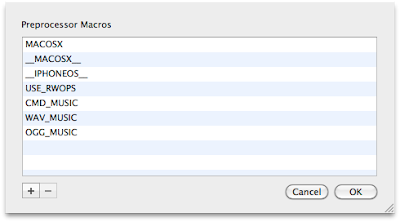
Third: Expand the Targets label on the left and double click on Static Library; this will show the specific target options. Select the Preprocessor macros doubleclicking it and modify it by removing MID_MUSIC, MOD_MUSIC and USE_NATIVE_MIDI and add __IPHONEOS__ definition.
 Fourth: One last step, remove native_midi_macosx.c from the Compile Sources list in your Static Library target and the library is ready! It's compile time!
Sound great doesn't it? However here is bad news: for our application to correcly load OGG file (and most likely mp3 as well but i haven't tested it) we'll need another library to correctly link the various ogg functions. Don't worry, I'll guide you!
We have two options:
1- we can download ogg and vorbis and compile them from command line, set up the dependencies between the two, fix the paths and so on... if you're eager to try the command line is this:
< ./configure --prefix=/usr/local/iphone --host=arm-apple-darwin --enable-static=yes --enable-shared=no CC=/Developer/Platforms/iPhoneOS.platform/Developer/usr/bin/arm-apple-darwin9-gcc-4.2.1 CFLAGS="-pipe -mdynamic-no-pic -std=c99 -Wno-trigraphs -fpascal-strings -fasm-blocks -O2 -Wreturn-type -Wunused-variable -fmessage-length=0 -fvisibility=hidden -miphoneos-version-min=3.1 -gdwarf-2 -I/Developer/Platforms/iPhoneOS.platform/Developer/SDKs/iPhoneOS3.1.sdk/usr/include/libxml2 -isysroot /Developer/Platforms/iPhoneOS.platform/Developer/SDKs/iPhoneOS3.1.sdk" CPP=/Developer/Platforms/iPhoneOS.platform/Developer/usr/bin/cpp AR=/Developer/Platforms/iPhoneOS.platform/Developer/usr/bin/ar LDFLAGS="-isysroot /Developer/Platforms/iPhoneOS.platform/Developer/SDKs/iPhoneOS3.1.sdk -Wl,-dead_strip -miphoneos-version-min=3.1" >
2- we can simply use Tremor, which is an ogg implementation designed for memory constrained device with only integer operations: perfect for the iphone!
It comes bundled in another project, Cocos2d, a great framework for games. If you download it and select the libvorbis target, you will get a single decoding library statically linked for the iphone. It's compile time again!
Place both libraries in the Frameworks folder of your application and... Enjoy your ogg audio on the iphone!
Please drop a comment for critics and suggestions (and appreciations too :) )
Vittorio
First: open the XCode.tar.gz archive in the SDL_mixer sources, and load the project file in Xcode.
Second: go the project preferences and modify the base sdk and architecture like in the picture
 Of course you can choose a lower sdk, i successfully compiled the library for iphone 2.0. Once in the main windows again choose the "Static Library" from the Active Target list.
Third: Expand the Targets label on the left and double click on Static Library; this will show the specific target options. Select the Preprocessor macros doubleclicking it and modify it by removing MID_MUSIC, MOD_MUSIC and USE_NATIVE_MIDI and add __IPHONEOS__ definition.
 Fourth: One last step, remove native_midi_macosx.c from the Compile Sources list in your Static Library target and the library is ready! It's compile time!
Sound great doesn't it? However here is bad news: for our application to correcly load OGG file (and most likely mp3 as well but i haven't tested it) we'll need another library to correctly link the various ogg functions. Don't worry, I'll guide you!
We have two options:
1- we can download ogg and vorbis and compile them from command line, set up the dependencies between the two, fix the paths and so on... if you're eager to try the command line is this:
< ./configure --prefix=/usr/local/iphone --host=arm-apple-darwin --enable-static=yes --enable-shared=no CC=/Developer/Platforms/iPhoneOS.platform/Developer/usr/bin/arm-apple-darwin9-gcc-4.2.1 CFLAGS="-pipe -mdynamic-no-pic -std=c99 -Wno-trigraphs -fpascal-strings -fasm-blocks -O2 -Wreturn-type -Wunused-variable -fmessage-length=0 -fvisibility=hidden -miphoneos-version-min=3.1 -gdwarf-2 -I/Developer/Platforms/iPhoneOS.platform/Developer/SDKs/iPhoneOS3.1.sdk/usr/include/libxml2 -isysroot /Developer/Platforms/iPhoneOS.platform/Developer/SDKs/iPhoneOS3.1.sdk" CPP=/Developer/Platforms/iPhoneOS.platform/Developer/usr/bin/cpp AR=/Developer/Platforms/iPhoneOS.platform/Developer/usr/bin/ar LDFLAGS="-isysroot /Developer/Platforms/iPhoneOS.platform/Developer/SDKs/iPhoneOS3.1.sdk -Wl,-dead_strip -miphoneos-version-min=3.1" >
2- we can simply use Tremor, which is an ogg implementation designed for memory constrained device with only integer operations: perfect for the iphone!
It comes bundled in another project, Cocos2d, a great framework for games. If you download it and select the libvorbis target, you will get a single decoding library statically linked for the iphone. It's compile time again!
Place both libraries in the Frameworks folder of your application and... Enjoy your ogg audio on the iphone!
Please drop a comment for critics and suggestions (and appreciations too :) )
Vittorio
Thursday, 10 December 2009
So i've adhered to TNES campaign -- The New Exposé Sucks
well the title says it all...
i really really really DON'T like new Exposé features under Snow Leopard.
i could stand the WOW SO APPEALING elecritic blue for the glow... some guys like blue, i too like blue, but under the windows? glowing? a blue rectangle of BLUE color popping out when the windows are placing? not on my watch...
anyways you can change it easily so it's not a big deal
what really drives me crazy is something that itook a little to realize: the windows placement!
OH _ MY _ GOD _ (in blue)
what effect is that? all windows in a grid? where is the piece of art effect that would resize and place the windows according to their positions? am i running a compiz plugin? is that some rejected Windoze effect that somehow got in Snow Leopard sources?
i couldn't believe my eyes! Luckily then i found some scientific grounds to understand WHY i wasn't really liking the new exposè: it has to do with usability and feel experience, read more on these two posts
http://www.loyalmoses.com/2009/08/snow-leopards-expose-bad/
http://www.indextwo.com/bring-back-the-old-expose/
and so i've officially joined the anti-new-exposé campaign (all blue) and i hope that you join it too! To participate, just write some lines here http://www.apple.com/feedback/macosx.html telling 'em how much you dislike the new exposé and want an option to bring the old one back!
let's hope in a future service pack... whoops i meant software update!
i really really really DON'T like new Exposé features under Snow Leopard.
i could stand the WOW SO APPEALING elecritic blue for the glow... some guys like blue, i too like blue, but under the windows? glowing? a blue rectangle of BLUE color popping out when the windows are placing? not on my watch...
anyways you can change it easily so it's not a big deal
what really drives me crazy is something that itook a little to realize: the windows placement!
OH _ MY _ GOD _ (in blue)
what effect is that? all windows in a grid? where is the piece of art effect that would resize and place the windows according to their positions? am i running a compiz plugin? is that some rejected Windoze effect that somehow got in Snow Leopard sources?
i couldn't believe my eyes! Luckily then i found some scientific grounds to understand WHY i wasn't really liking the new exposè: it has to do with usability and feel experience, read more on these two posts
http://www.loyalmoses.com/2009/08/snow-leopards-expose-bad/
http://www.indextwo.com/bring-back-the-old-expose/
and so i've officially joined the anti-new-exposé campaign (all blue) and i hope that you join it too! To participate, just write some lines here http://www.apple.com/feedback/macosx.html telling 'em how much you dislike the new exposé and want an option to bring the old one back!
let's hope in a future service pack... whoops i meant software update!
Wednesday, 9 December 2009
New Xcode and New provisioning sk..ript
So i like the new Xcode 3.2, but i liked the provisioning skip more in previous versions...
Anyways this is the method i tried and it (miracously) worked
http://www.iphonedevsdk.com/forum/iphone-sdk-tools-utilities/20983-sdk-3-0-xcode-3-1-3-build-go-jailbroken-device-4.html#post129492
beware that python is indentation-sensitive so you have to carefully copy the script to make it work
Vittorio
Anyways this is the method i tried and it (miracously) worked
http://www.iphonedevsdk.com/forum/iphone-sdk-tools-utilities/20983-sdk-3-0-xcode-3-1-3-build-go-jailbroken-device-4.html#post129492
beware that python is indentation-sensitive so you have to carefully copy the script to make it work
Vittorio
Thursday, 19 November 2009
docs and news
besides the usual links for the stuff hosted on scribd
http://www.scribd.com/doc/22741568/Telecommunication-Electronics
http://www.scribd.com/doc/22741277/slides-Microprocessor-Based-Systems-48-32-bit-division-algorithm-flow-chart
http://www.scribd.com/doc/22740990/Elettronica-Applicata
we also have great news! Due to popular deman of nobody, all the slides published on Scribd will be ALSO published on SlideShare, to achieve maximum visibility!
http://www.slideshare.net/ProjectSymphony
here is the new outstanding link! don't worry we'll keep both upload systems -- older slides have been uploaded to slideshare and kept on scribd -- newer slides will be published on both!
Enjoy it fully!!!
Vittorio
http://www.scribd.com/doc/22741568/Telecommunication-Electronics
http://www.scribd.com/doc/22741277/slides-Microprocessor-Based-Systems-48-32-bit-division-algorithm-flow-chart
http://www.scribd.com/doc/22740990/Elettronica-Applicata
we also have great news! Due to popular deman of nobody, all the slides published on Scribd will be ALSO published on SlideShare, to achieve maximum visibility!
http://www.slideshare.net/ProjectSymphony
here is the new outstanding link! don't worry we'll keep both upload systems -- older slides have been uploaded to slideshare and kept on scribd -- newer slides will be published on both!
Enjoy it fully!!!
Vittorio
Thursday, 12 November 2009
BEWARE of Nintendo DS FAKES
Pay lot of attention when purchasing a Nintendo DS videogame on Internet, eBay in particular... if the price is too good to be true, it's most likely a fraud.
The general advice is that everything that comes from china/hongkong is fake, that is, is a pirated version of the game built in mocked up ds cartrige. While it is true that 99% of what comes from those places is fake, importers can bring faked games worldwide, so geographic scanning is a no go.
There are ways to tell if a gamecard is fake (http://www.pocketgamer.co.uk/r/DS/feature.asp?c=2191) but untill the game is arrived you have no way to determine it.
Well no more, thanks to the DSi!
In fact the dsi has shrunk a little its slot, so that good games can enter, but fake ones cannot!
So every fake ds game on ebay will have "for DS/DSL but not DSi"
GOTCHA! IF YOU SEE THAT WARNING STAY AWAY FROM THAT AUCTION
Vittorio
The general advice is that everything that comes from china/hongkong is fake, that is, is a pirated version of the game built in mocked up ds cartrige. While it is true that 99% of what comes from those places is fake, importers can bring faked games worldwide, so geographic scanning is a no go.
There are ways to tell if a gamecard is fake (http://www.pocketgamer.co.uk/r/DS/feature.asp?c=2191) but untill the game is arrived you have no way to determine it.
Well no more, thanks to the DSi!
In fact the dsi has shrunk a little its slot, so that good games can enter, but fake ones cannot!
So every fake ds game on ebay will have "for DS/DSL but not DSi"
GOTCHA! IF YOU SEE THAT WARNING STAY AWAY FROM THAT AUCTION
Vittorio
Subscribe to:
Comments (Atom)